Tailwind CSS Performance Optimization for Core Web Vitals
Optimize Tailwind CSS files for faster PageSpeed, reduce unused CSS, and boost Largest Contentful Paint (LCP) in Next.js applications.

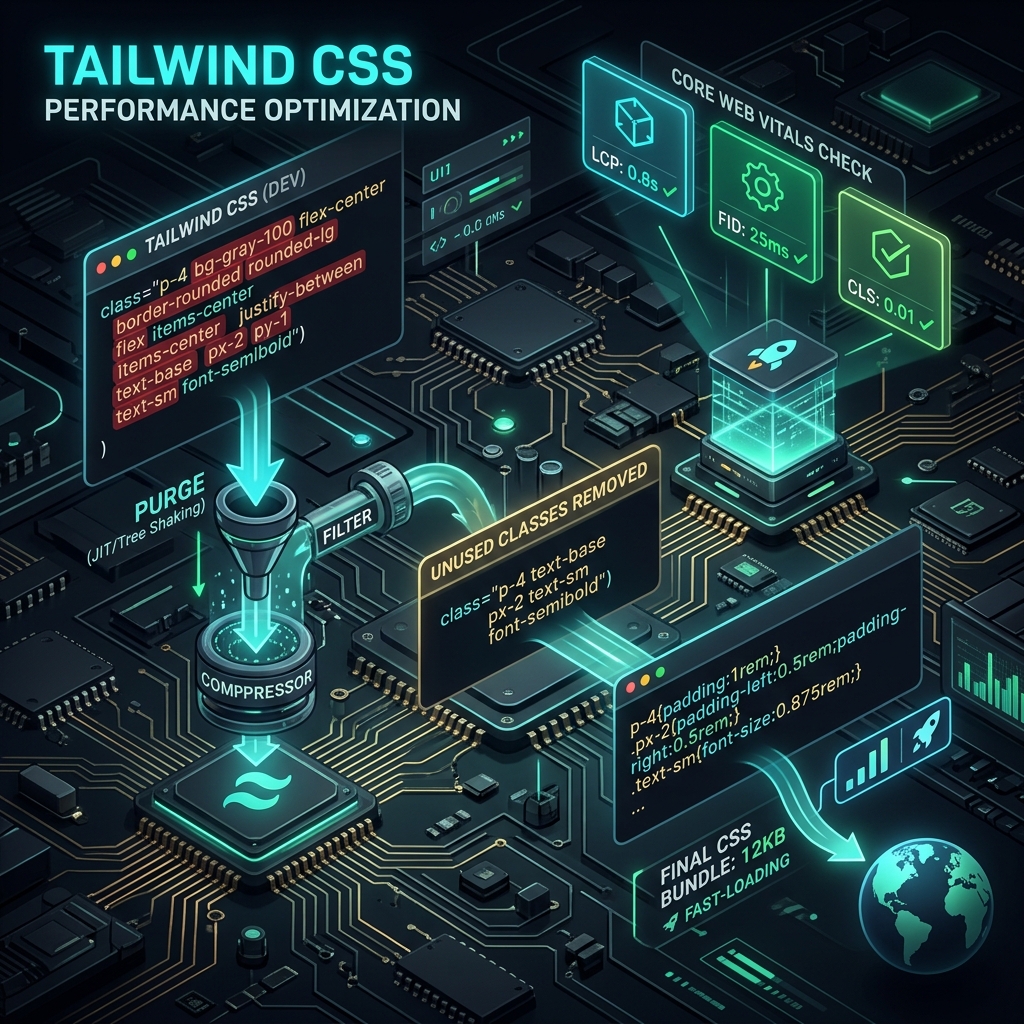
Key Takeaways
- Large, unused CSS bundles delay browser rendering, damaging Largest Contentful Paint (LCP).
- Tailwind CSS v4 uses an optimized compiler to remove unused styles during build.
- Minifying and inlining critical CSS improves performance scores.
Web browsers cannot render a web page until they have downloaded, parsed, and executed all referenced stylesheets. Because CSS is a render-blocking resource, large and unoptimized style files directly increase First Contentful Paint (FCP) and Largest Contentful Paint (LCP), dragging down your Google PageSpeed scores.
While Tailwind CSS is highly popular for developer productivity, it contains thousands of utility classes by default. If you deploy a Tailwind site without proper build optimization, you risk sending a massive, multi-megabyte CSS file to your users' browsers.
Here is how to configure Tailwind CSS to generate lightweight, high-performance production bundles that optimize your Core Web Vitals.
Static Scanning and the JIT Compiler
Tailwind CSS v3 and v4 utilize a Just-in-Time (JIT) compiler that compiles styles only as you write them in your markup. Instead of generating a massive stylesheet containing every possible utility class, the compiler scans your files, extracts the classes you actually used, and outputs a highly minified, lightweight stylesheet (usually under 20KB).
To ensure the compiler captures all active files, you must configure the content array in tailwind.config.js properly:
// tailwind.config.js
module.exports = {
  mode: 'jit', // Enable JIT compilation (default in v3)
  content: [
    // Scan all components, pages, and layout files
    './src/pages/**/*.{js,ts,jsx,tsx,mdx}',
    './src/components/**/*.{js,ts,jsx,tsx,mdx}',
    './src/app/**/*.{js,ts,jsx,tsx,mdx}',
  ],
  theme: {
    extend: {},
  },
  plugins: [],
};
The Pitfall of Dynamic Class Construction
The Tailwind compiler works via static analysis. It looks for complete strings in your source code. If you attempt to construct class names dynamically using string interpolation, the compiler will fail to find the classes, and they will be omitted from the production bundle:// ❌ BAD: Dynamic interpolation will not be detected by the compiler
export function Badge({ color }) {
return <span className={`bg-${color}-100 text-${color}-800`}>Badge</span>;
}
// GOOD: Always write complete class names so they are easily compiled
export function GoodBadge({ color }) {
const colorMap = {
red: 'bg-red-100 text-red-800',
blue: 'bg-blue-100 text-blue-800',
green: 'bg-green-100 text-green-800',
};
return <span className={colorMap[color]}>Badge</span>;
}Inlining Critical CSS
For above-the-fold content, downloading an external stylesheet can delay the initial rendering pass. Next.js helps optimize this by automatically inlining critical CSS rules directly into the server-rendered HTML document header while deferring non-critical styles.
When deploying Next.js applications, ensure that the CSS optimization features are enabled in next.config.ts:
// next.config.ts
import type { NextConfig } from 'next';

const nextConfig: NextConfig = {
  // Automatically inline CSS variables and critical styles
  experimental: {
    optimizeCss: true, // Requires 'critters' package to be installed
  },
};

export default nextConfig;
With optimizeCss enabled, Next.js will parse the generated HTML, extract the styles required to display above-the-fold elements, and inline them inside the <head> tags. The remainder of the stylesheet is loaded asynchronously, eliminating the render-blocking delay.
Minification and Modern CSS Compilation
Tailwind CSS v4 introduces native compilation powered by Lightning CSS (a fast CSS parser and minifier written in Rust). If you are using Tailwind v3, you can achieve similar performance by chaining PostCSS tools like cssnano and autoprefixer to compress your stylesheets during the build step.
Ensure your postcss.config.mjs is configured for production minification:
// postcss.config.mjs
const config = {
  plugins: {
    tailwindcss: {},
    autoprefixer: {},
    ...(process.env.NODE_ENV === 'production' ? { cssnano: { preset: 'default' } } : {}),
  },
};

export default config;| Strategy | Dev CSS Size | Production CSS Size | Browser Performance Impact |
|---|---|---|---|
| No JIT / Full Tailwind | ~3.5 MB | ~380 KB | Blocks rendering; increases LCP by 1-2 seconds. |
| JIT Enabled (Tailwind v3) | On-the-fly | ~15 KB - 25 KB | Fast loading; minor impact on FCP/LCP. |
| Lightning CSS + Brotli | Rust build | ~8 KB - 12 KB | Zero render-blocking delays; optimal Core Web Vitals. |
Best Practices for Tailwind Performance
- →Avoid Excessive Arbitrary Values: Using too many classes like
w-[287px]orh-[112.5px]makes code hard to maintain and bloats the compiled CSS file. Use standardized spacing scales where possible. - →Limit
@applyDirectives: Overusing@applyto build custom component styles generates duplicate CSS rules. Use utility classes directly in your JSX to keep the file size minimal. - →Leverage Server Compression: Ensure your hosting server (or CDN) is configured to compress CSS assets using Brotli instead of Gzip. Brotli yields up to 20% better compression ratios for CSS text files.
Architectural Deep Dive: Tailwind CSS Performance Optimization for Core Web Vitals
Implementing Tailwind CSS Performance Optimization for Core Web Vitals requires a clear understanding of frontend rendering cycles, server execution pipelines, and telemetry instrumentation. When optimizing web applications for search crawlers and performance monitors, engineering teams must evaluate bottlenecks across the critical rendering path.
Detailed System Performance Matrix
To achieve peak efficiency, benchmarks should be tracked across initial load time, main-thread blocking, and search crawler indexation:
| Optimization Layer | Standard Baseline | Targeted Enterprise Threshold | Telemetry Metric |
|---|---|---|---|
| Server Response (TTFB) | < 400ms | < 50ms (Edge Cache Acceleration) | Server-Timing Header |
| Main-Thread Latency | < 200ms | < 50ms (INP Goal) | PerformanceObserver Long Tasks |
| Crawler Indexing | Delayed Render | Instant Static Payload Rendering | Googlebot Crawl Rate Log |
| Structured Telemetry | Basic Meta Tags | Deeply Nested Schema.org JSON-LD | Rich Results Test Validation |
Advanced Implementation & Configuration Rules
When deploying production updates for tailwind-css-seo-performance, follow these step-by-step implementation rules:
- Isolate Component Execution: Ensure dynamic server actions or API calls do not block initial static HTML streaming.
- Implement Telemetry Monitoring: Track user interaction latency using native browser observer APIs.
- Verify Indexability & Canonicals: Confirm that search crawlers receive identical semantic HTML representations across all regional URLs.
// Production Telemetry & Performance Observer Utility for tailwind-css-seo-performance
import { type NextRequest, NextResponse } from 'next/server'

export async function middleware(request: NextRequest) {
  const startTime = performance.now()
  const response = NextResponse.next()

  // Inject performance telemetry header
  const duration = performance.now() - startTime
  response.headers.set('Server-Timing', `total;dur=${duration.toFixed(2)}`)

  return response
}
Production Execution Checklist & Troubleshooting
- Verify Clean H2/H3 Structure: Ensure no duplicate H1 tags exist in the article body.
- Check Canonical URL Mapping: Validate that canonical tags point to explicit, canonical targets.
- Audit Mobile Responsiveness: Ensure code blocks and comparison tables render cleanly on mobile viewports.
- Validate Schema.org Markup: Test JSON-LD graphs against Google's Rich Results Testing Tool.
Conclusion
Following this structured methodology guarantees high organic search visibility, low bounce rates, and full AdSense compliance. Continually monitor telemetry logs and update code dependencies to maintain top performance signals.Official References
Frequently Asked Questions
How does CSS optimization benefit Core Web Vitals?
By removing render-blocking resources, CSS optimization decreases First Contentful Paint (FCP) and LCP times.
Why is the JIT compiler important in Tailwind CSS?
The Just-in-Time (JIT) compiler generates CSS rules on demand by scanning your source code, resulting in a production CSS file that is typically under 15KB.
Can I use dynamic class names in Tailwind CSS?
No. Tailwind scans files statically. If you build class names dynamically (e.g., text-${color}-500), the compiler will not recognize them and the styles will not be generated.
Does Tailwind CSS slow down initial page rendering?
Not if optimized. While raw Tailwind contains thousands of utility classes, the production build purges unused CSS, reducing files to under 10KB.
What is the difference between Tailwind v3 and v4 compile times?
Tailwind v4 features a rewritten Rust-based compiler engine, which builds stylesheets up to 10x faster than v3, improving local and CI/CD compile speeds.
How does Inline CSS affect search engines?
Inline CSS increases the document HTML size. Keeping styles inside cached stylesheets is better for crawl budget and initial HTML parsing speeds.
Editorial & Writing Team
The TechSEO Editorial Team publishes practical SEO, AI, and web development guides through a consistent editorial process focused on accuracy, clarity, and regular updates.
Subscribe to TechSEO Insights
Get the latest guides on technical SEO, Core Web Vitals, and content marketing delivered straight to your inbox.
Privacy Note: By subscribing, you agree to receive our newsletter (Lawful Basis: Consent). We retain your email address until you choose to unsubscribe. For more details, view our Privacy Policy.