Content Refresh Strategy: How to Update Old Content and Increase Organic Traffic (2026)
Systematically identify and refresh underperforming content to reclaim lost traffic, improve rankings, and maximize the ROI of your existing content library.

Key Takeaways
- Refreshing existing content often delivers a higher return on investment than writing new articles from scratch.
- Identify decay candidates by filtering for pages with landing page traffic declines of over 20% in Google Analytics 4.
- Focus first on quick wins—pages ranking in positions 4 to 10 that need metadata optimization or minor depth updates.
- Update publication dates and sitemap schemas after refreshing content to prompt search bots to crawl the page.
Most content marketing teams focus entirely on creation: publishing new articles week after week. While a high volume of content expands your keyword footprint, neglecting your existing articles can lead to a common issue: content decay.
Over time, older pages lose organic traffic. Information becomes outdated, links break, and search engines prioritize newer pages from competitors. Instead of spending resources on new content, implementing a structured content refresh strategy can help you reclaim lost organic traffic, improve search engine visibility, and maximize the return on your content assets.
This guide outlines a data-driven content refresh framework. We will cover methods for identifying traffic drops, workflows for updating page elements, and best practices to keep your content library ranking in 2026.
[!NOTE] A successful content refresh relies on technical crawl efficiency. To ensure search engines can index your updated pages quickly, use this guide alongside our Technical SEO Audit Checklist and Log File Analysis for SEO.
1. What Is a Content Refresh Strategy?
A content refresh strategy is the systematic process of auditing, updating, and repromoting existing pages in your content library.
Rather than rewriting an entire article, a refresh focuses on improving underperforming sections. This includes updating statistics, adding details to match search intent, optimizing headings, fixing broken links, and revising title tags to improve CTR.
2. Why Content Refreshing Delivers High ROI
Updating existing content often yields a better return on investment than writing new articles:
Established Page Authority
An older page has already been crawled and indexed, and may have acquired external backlinks. A content refresh builds on this authority, whereas a new page starts with zero authority and history.Faster Results
Search engine crawlers typically index and rank refreshed pages within weeks. New articles can take months to rank on page one for competitive keywords.Resource Efficiency
Auditing and updating an existing page generally takes 2 to 4 hours. Researching, writing, and designing a new article from scratch can take 8 to 12 hours.3. The Anatomy of Content Decay
Content decay is the natural decline in organic traffic that occurs as content ages. It is typically caused by four factors:
graph TD
    A[Content Decay Drivers] --> B[Outdated Information & Dead Links]
    A --> C[Competitor Optimizations & Freshness]
    A --> D[Changes in Search Intent]
A --> E[Algorithmic Adjustment]- →Outdated Information: Statistics, screenshots, and product details become stale, causing exit rates to rise.
- →Competitor Activity: Competitors update their pages or publish newer, more comprehensive content, pushing your page down the SERPs.
- →Changes in Search Intent: The search query's intent shifts, and your layout no longer matches what users expect.
- →Algorithmic Updates: Search engines adjust their core ranking signals, prioritizing different layouts or trust elements.
4. Pre-Refresh Content Audit Framework
Before updating your content, run an audit using GA4 and GSC data to identify your best candidates:
1. Filter for Traffic Losses
Examine your organic landing page traffic in Google Analytics 4 over a 12-month period. Look for pages with traffic declines of over 20% compared to the previous year. Refer to our Google Analytics 4 Guide to set up custom data segments.2. Segment by Search Position
Use Google Search Console to check where your traffic drops are occurring. Categorize pages based on their average ranking position:Content Audit Classification Matrix
| GSC Position | Current CTR | Opportunity Type | Priority | Action Plan |
|---|---|---|---|---|
| 1-3 | High | Maintenance | Low | Add internal links, monitor search competitors |
| 4-10 | Low | Click-through optimization | High | Revise title hooks, add FAQ schema |
| 11-20 | Very Low | Content depth upgrade | Critical | Audit competitor subtopics, add 500+ words of unique value |
| 21+ | Near Zero | Consolidation or redirect | Medium | Merge with higher-ranking pages, apply 301 redirects |
5. Identifying Content Decay
Monitor these signals to detect decay early:
Content Decay Indicators
| Indicator | GSC Trend | GA4 Trend | Priority Level | Target Action |
|---|---|---|---|---|
| Underperforming CTR | High impressions, low CTR (< 1.5%) | N/A | High | Rewrite meta title and description, align with search intent |
| Position Decay | Position dropped from 3.2 to 8.5 | Organic landing page sessions -40% | Critical | Complete content update, add sections, update statistics |
| Outdated Information | Flat impressions, flat clicks | High exit rate (> 65%), low engagement | Medium | Update statistics, change dates, verify link health |
6. Python Script to Detect Content Decay
To automate the identification of content decay, you can write a Python script that takes a Google Search Console CSV export containing historical keyword and page data (e.g., Comparing the last 30 days vs. the preceding 30 days) and flags candidates:
## decay_detector.py
import pandas as pd

## Load your exported Google Search Console comparison CSV
## Expected columns: 'Page', 'Clicks (Last 30 Days)', 'Clicks (Preceding 30 Days)', 'Position (Last 30 Days)', 'Position (Preceding 30 Days)'
def detect_decay(csv_path):
    try:
        df = pd.read_csv(csv_path)

        # Calculate click difference
        df['click_change'] = df['Clicks (Last 30 Days)'] - df['Clicks (Preceding 30 Days)']

        # Calculate position change (positive value = ranking dropped)
        df['position_change'] = df['Position (Last 30 Days)'] - df['Position (Preceding 30 Days)']

        # Filter for decaying pages: Clicks dropped by > 15% and average position worsened by > 1.0
        decay_candidates = df[
            (df['click_change'] < 0) &
            (df['position_change'] > 1.0)
        ].copy()

        # Sort by worst click loss first
        decay_candidates = decay_candidates.sort_values(by='click_change', ascending=True)

        print(f"Identified {len(decay_candidates)} content decay candidates:")
        print(decay_candidates[['Page', 'click_change', 'position_change']].head(10))

        # Save to CSV for the content team
        decay_candidates.to_csv('decay_audit_results.csv', index=False)

    except Exception as e:
        print(f"Error parsing GSC export file: {e}")

if __name__ == '__main__':
    detect_decay('gsc_comparison_export.csv')
7. Optimization Workflows by Ranking Tiers
To maximize your results, divide your refresh candidates into distinct action workflows based on their current rankings:
Workflow A: The "Quick Wins" (Positions 4–10)
Pages ranking at the bottom of page one are your best opportunities. Since they are already visible, minor changes can push them into the top three spots, resulting in significant traffic increases.- →Step 1: Run a keyword extraction in GSC to identify search queries driving impressions but few clicks.
- →Step 2: Optimize your title tags and meta descriptions to improve CTR.
- →Step 3: Inspect the SERPs for top-ranking pages to check for schema options (like FAQ or HowTo).
- →Step 4: Add internal links from pages on your site with high page authority.
Workflow B: The "Major Revamps" (Positions 11–20)
Pages on page two require deeper content updates to rank on page one.- →Step 1: Perform a search intent analysis. Check if top-ranking pages are listicles, guides, or tool pages, and align your layout.
- →Step 2: Conduct a content gap audit. Identify subtopics covered by competitors that your page misses.
- →Step 3: Expand the content by adding sections, diagrams, or calculators to increase engagement times.
- →Step 4: Rewrite thin sections to improve comprehensiveness and readability.
Workflow C: Content Pruning and Consolidation (Positions 21+)
If a page ranks beyond position 20 and has received no organic traffic or links in 12 months, it is a candidate for pruning or consolidation.- →Option 1 (Consolidation): Merge the content into a higher-authority page on a similar topic, and set up a 301 redirect.
- →Option 2 (De-indexing): If the content is outdated and offers no value, delete it and return a
410 Gonestatus code.
8. Step-by-Step Content Refresh Workflow
Once you have selected your refresh candidates, follow this optimization process:
Content Refresh Workflow Table
| Step | Phase | Key Action | Tool used | Primary Deliverable |
|---|---|---|---|---|
| 1 | Identification | Filter GA4/GSC landing page traffic drops over 12 months | Google Analytics 4 | List of decay candidate URLs |
| 2 | SERP Audit | Inspect top-ranking competitor headers, length, and UX | Web Browser / GSC | Competitor content gap list |
| 3 | Optimization | Update body text, statistical facts, and internal links | CMS / Next.js | Refreshed article text |
| 4 | Deployment | Update updated-at date, submit URL in GSC inspection | Google Search Console | Re-indexation request |
Step 1: Analyze Search Intent
Search for your target keywords and review the top-ranking pages. Has the intent changed? If the top results are now listicles, but your page is a long-form guide, you may need to adjust your format.Step 2: Conduct a Content Gap Analysis
Compare your article with top competitors. Identify key details they cover that you do not. Add new sections or expand thin paragraphs to match the depth of top-ranking pages. If you use AI to support content scaling, review our AI SEO Content Writing Guide to ensure your updates are helpful and original.Step 3: Update Outdated Facts and Statistics
Replace outdated data points with current research. Verify that all external links point to active, authoritative sources, and fix any broken links.Step 4: Optimize Internal Linking
Add internal links from your refreshed page to newer related articles. Link to your refreshed page from high-authority pages on your site to pass page authority. For details on scaling this, check our Programmatic SEO Guide.9. Technical On-Page Refresh Tactics
Headline Optimization for CTR
A meta title change can improve your click-through rate. Use descriptive hooks and update year markers to show freshness:## Title tag refresh comparison
Before: "B2B SaaS Content Strategy Framework"
After: "B2B SaaS Content Strategy Framework: Complete Step-by-Step Guide (2026)"Image Asset Optimization
- →Verify Dimensions: Ensure images meet size guidelines, especially if the page is eligible for Google Discover.
- →Add Alt Text: Write descriptive image alt text containing your target keywords.
- →Compress Images: Use formats like WebP to ensure fast mobile load speeds. Refer to our Core Web Vitals Optimization Guide for image performance tips.
Schema Markup Implementation
Implement structured data to help search engines understand your content updates. AddArticle and FAQ schemas, ensuring the metadata matches your page elements. For configuration details, review our Structured Data & Schema Markup Guide.
10. Managing Internal Link Rot
During a refresh, auditing outbound and inbound internal links is key to maintaining site crawler flow.
- →Fix Broken Links: Check that all internal links on the page point to active
200 OKpages, and redirect or update links pointing to deleted/redirected pages. - →Update Anchor Text: Ensure anchor text is descriptive and keyword-focused rather than generic (like "click here").
- →Audit Inbound Anchors: Check which internal pages link to your refreshed page. Update their anchor text to match the new focus keywords.
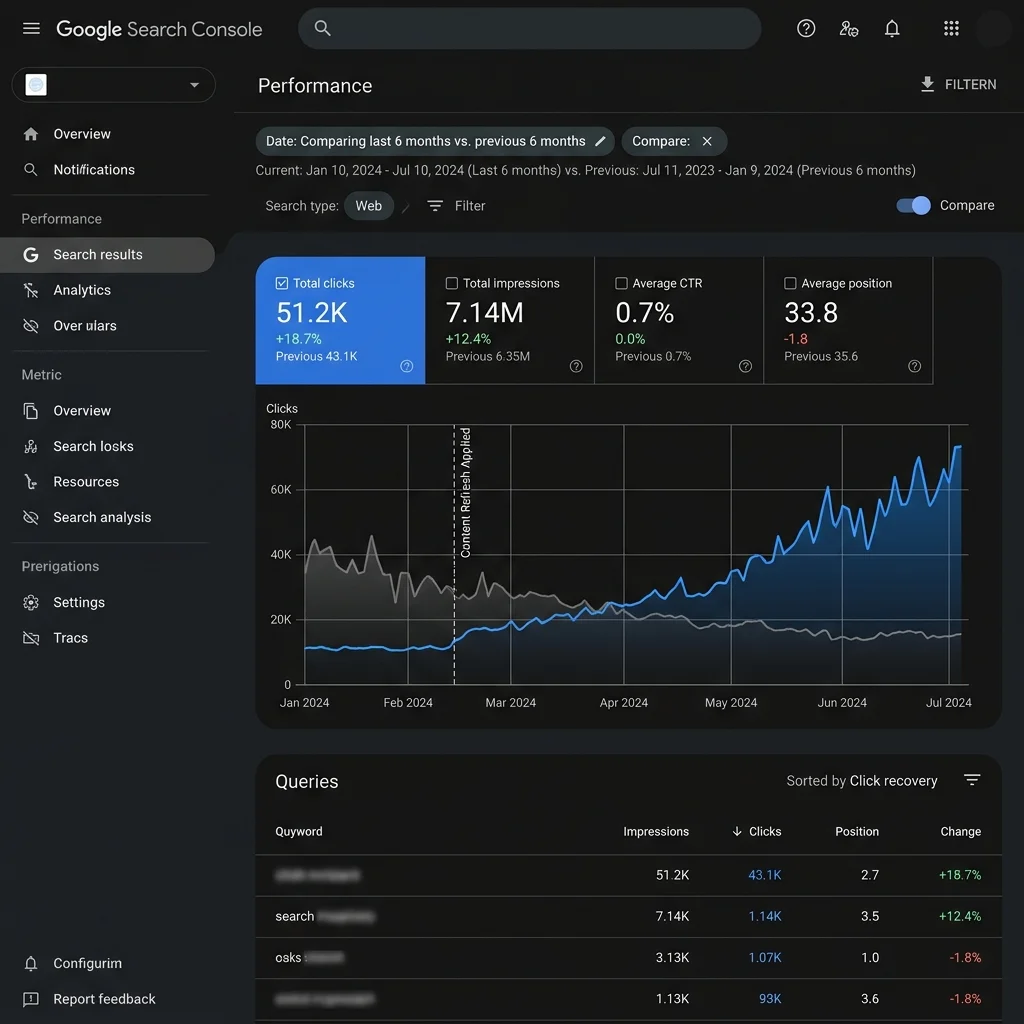
11. Launching and Monitoring Your Relaunch
Treat your content refresh like a new launch:
- Update Published Dates: Set the
updatedAtmetadata in your frontmatter to reflect the refresh date. - Submit for Crawling: Run the URL through GSC’s URL Inspection tool and click Request Indexing.
- Promote the Page: Share the updated article through your email newsletter and social channels to drive initial traffic.
- Monitor Performance: Track impressions, CTR, and search positions in GSC daily for 30 days.
12. Common Content Refresh Mistakes
Avoid these common optimization mistakes:
Common Refresh Mistakes & Solutions
| Mistake | SEO Consequence | Modern Correction / Solution |
|---|---|---|
| Changing URL slug | Breaks incoming backlinks, drops page authority | Retain legacy URL. Implement 301 redirects only if URL change is mandatory |
| Stripping ranking keywords | Drops rankings for secondary search queries | Check ranking keywords in GSC before editing, preserve matching sections |
| Failing to update date | Search bots and users treat content as old | Update updatedAt date metadata in frontmatter, publish fresh date |
| Neglecting page speed | Poor mobile experience, rank declines | Check performance in PageSpeed Insights, optimize image sizes |
13. Content Strategy Implementation Checklist
- Export organic: landing page sessions from GA4.
- Identify pages: with traffic drops of over 20% year-over-year.
- Group pages: by search position (1-3, 4-10, 11-20, 21+).
- Search target: keywords and analyze competitor content gaps.
- Update outdated: statistics and facts.
- Fix broken: links and external references.
- Optimize meta: titles and descriptions to improve CTR.
- Add internal: links from high-authority pages.
- Add structured: schema markup.
- Update the:
updatedAtdate in your page metadata. - Submit the: URL for re-indexing in Google Search Console.
- Share the: updated article through email and social channels.
- Monitor search: positions and impressions for 30 days post-launch.
14. Common Content Strategy Mistakes
- →Relying on: raw, unedited AI content that lacks personal experience or original examples.
- →Targeting high-volume: keywords without matching the commercial search intent of users.
- →Failing to: prune or redirect thin, duplicate, or outdated articles during a content audit.
- →Neglecting to: add contextual internal links to related topic clusters.
15. Official References
16. Conclusion
Successful execution of Content Refresh Strategy: How to Update Old Content and Increase Organic Traffic (2026) strategies is foundational to securing your digital marketing success in 2026. Without precise technical structure and expert-level implementation, it is impossible to protect domain authority, satisfy search bots, and understand customer paths.
Audit your setup regularly, focus on high-quality content that meets E-E-A-T expectations, and monitor performance indicators closely.
To deepen your technical expertise, read our guides on Measuring Content Marketing ROI: Metrics That Matter, AI SEO Content Writing: Guide to Quality & Google E-E-A-T (2026), and Thought Leadership Content That Builds Authority and Trust.
Official References
- →Google Search Central: Creating Helpful, Reliable, People-First Content
- →Google Search Central: AI-Generated Content Guidance
- →Google Analytics Help: Track Organic Traffic and Landing Page Performance
- →Google Search Central - Creating Helpful Content
- →Google Search Central - AI Content Best Practices
- →Content Marketing Institute - Strategy and Analytics Guides
Frequently Asked Questions
How often should I refresh old content?
Refresh your high-performing evergreen pages once or twice a year to maintain rankings. Standard blog posts can be reviewed every 12 to 18 months, or as soon as you notice a consistent drop in organic impressions.
Should I change the URL slug during a content refresh?
No. You should keep the original URL slug to preserve existing backlinks, internal links, and page authority. Only change the URL if the topic has changed completely, and make sure to implement a 1-to-1 301 redirect.
Does Google penalize sites for changing the publication date?
Google does not penalize sites for updating publication dates if the updates are substantial. However, changing the date without making meaningful content improvements is considered a manipulation tactic and can trigger spam flags.

Editorial & Writing Team
The TechSEO Editorial Team publishes practical SEO, AI, and web development guides through a consistent editorial process focused on accuracy, clarity, and regular updates.
Subscribe to TechSEO Insights
Get the latest guides on technical SEO, Core Web Vitals, and content marketing delivered straight to your inbox.
Privacy Note: By subscribing, you agree to receive our newsletter (Lawful Basis: Consent). We retain your email address until you choose to unsubscribe. For more details, view our Privacy Policy.