Log File Analysis for SEO: Find Crawl Waste, Redirect Loops, and Bot Dead Ends (2026)
Deep-dive log file analysis tutorial for SEOs. Learn how to verify Googlebot, eliminate crawl waste, fix redirect loops, and optimize server crawl budget.

Key Takeaways
- Log file analysis provides 100% accurate data on search engine crawler behavior, bypassing JavaScript tracking issues.
- Optimize crawl budget by identifying crawl waste such as duplicate parameters, faceted search URLs, and dead-end redirects.
- Implement reverse DNS lookup verification to distinguish legitimate Googlebot requests from malicious scrapers spoofing the user-agent.
- Detect orphan pages by cross-referencing crawling URLs in server logs against internal HTML crawl databases.
For technical SEOs, crawling a website with a tool like Screaming Frog is a standard auditing practice. However, a client-side crawl only simulates crawler behavior; it does not tell you what search engine spiders are actually doing. To see exactly how search engine crawlers interact with your website, you must conduct a log file analysis.
Analyzing your server access logs provides an accurate, unfiltered record of crawler behavior. It reveals which pages Googlebot prioritizes, how much crawl budget is wasted on duplicate parameters, where redirect loops block indexation, and which pages are ignored.
This guide provides an advanced tutorial on SEO log file analysis. We will cover server log formats, methods for verifying legitimate Googlebot requests, and practical steps to analyze log data using Screaming Frog, Python, and Google BigQuery.
[!NOTE] Log file analysis is a core component of a comprehensive website audit. To combine crawl diagnostics with search performance and speed data, use this guide alongside our Technical SEO Audit Checklist and Core Web Vitals Guide.
1. What Is Log File Analysis?
Every time a user, web scraper, or search engine spider requests a file from your server, the server records the interaction in an access log file.
Log file analysis for SEO is the practice of filtering these raw server logs to isolate requests made by search engine crawlers (such as Googlebot or Bingbot). By analyzing this data, you can track:
- →Crawl frequency: How often spiders visit your website.
- →Crawl budget distribution: Which folders or templates receive the most crawl activity.
- →Status code errors: Instances of
404 Not Found,500 Server Error, or redirect loops encountered by bots. - →Orphan pages: Indexable pages that receive crawler traffic but are not linked internally.
2. Why Log Files Matter For SEO
Analyzing server logs is particularly valuable for large websites (over 10,000 URLs), e-commerce platforms with faceted navigation, and dynamic web applications. It helps you address:
Crawl Budget Optimization
Google allocates a specific "crawl budget" to every site—the number of URLs Googlebot can and wants to crawl in a given timeframe. If Googlebot spends its budget crawling duplicate filter pages, it may miss new or updated content. To learn more about managing search engine crawl activity, refer to our Crawl Budget Optimization Guide.Precise Migration Audits
During a platform change, monitoring log files in real-time allows you to verify that legacy URLs redirect to their new destinations and check that search crawlers are not encountering broken links. For a complete migration roadmap, review our Website Migration SEO Checklist.Hidden Error Detection
Some errors are difficult to detect via browser-based crawls. For example, if a database query fails intermittently under search spider crawl loads, server logs will record these500 Internal Server Errors, helping you diagnose performance bottlenecks.
3. How Googlebot Crawls Websites
Googlebot’s crawl process is driven by algorithms that prioritize pages based on popularity, update frequency, and link equity.
graph TD
    A[Scheduler / Crawl Queue] --> B[DNS Resolution]
    B --> C[Fetch robots.txt]
    C --> D{Allowed to crawl?}
    D -- No --> E[Log 403 / Skip URL]
    D -- Yes --> F[Fetch Page HTML]
    F --> G{Render CSS/JS required?}
    G -- Yes --> H[WRS Web Rendering Service]
    G -- No --> I[Process HTML / Extract Links]
    H --> I
    I --> J[Update Index / Feed Links back to Scheduler]
Googlebot uses two primary crawler types:
- Googlebot Desktop: Simulates a user on a desktop browser.
- Googlebot Smartphone: Simulates a user on a mobile device. Under Google's mobile-first indexing, the smartphone crawler handles the vast majority of crawling and indexing requests.
4. Understanding Server Log Files
Server logs record data in standard, space-separated text formats. The most common format is the Common Log Format (CLF) or the Combined Log Format.
A typical log entry contains:
- →IP Address: The IP address of the client making the request.
- →Timestamp: The date and time of the request.
- →HTTP Method: The action requested (typically
GETorPOST). - →Requested Path: The URL path of the requested resource.
- →HTTP Status Code: The server response (e.g.,
200,301,404). - →Bytes Sent: The size of the downloaded resource.
- →User-Agent: The browser or bot identifier.
5. Common Log File Formats
Different server setups output logs in slightly different configurations. Here are examples of standard formats:
Apache Log Example
Apache servers typically use the Combined Log Format:127.0.0.1 - - [18/Jun/2026:11:15:30 +0530] "GET /blog/nextjs-seo-best-practices HTTP/1.1" 200 45290 "https://www.seotech.app/" "Mozilla/5.0 (compatible; Googlebot/2.1; +http://www.google.com/bot.html)"Nginx Log Example
Nginx logs use a similar structure, often including performance metrics like request time:66.249.66.1 - - [18/Jun/2026:11:16:05 +0530] "GET /blog/technical-seo-audit-checklist HTTP/1.1" 301 0 "-" "Mozilla/5.0 (iPhone; CPU iPhone OS 14_7_1 like Mac OS X) AppleWebKit/605.1.15 (KHTML, like Gecko) Version/14.1.2 Mobile/15E148 Safari/604.1 (compatible; Googlebot/2.1; +http://www.google.com/bot.html)"CDN Logs
CDNs like Cloudflare, Fastly, or Akamai log traffic at the network edge. These logs are useful because they aggregate global bot visits and include metadata like country, firewall action, and CDN cache status.6. Identifying and Verifying Googlebot
Legitimate Googlebot requests identify themselves using specific user-agents. However, user-agents can be easily spoofed by malicious scrapers and crawler bots. To ensure your data is accurate, you must verify that the requests originate from Google's IP addresses.
Googlebot User-Agent Examples
| Crawler Name | Primary User-Agent String | Typical Crawl Focus |
|---|---|---|
| Googlebot Smartphone | Mozilla/5.0 (Linux; Android 6.0.1; Nexus 5X Build/MMB29P) AppleWebKit/537.36 (KHTML, like Gecko) Chrome/W.X.Y.Z Mobile Safari/537.36 (compatible; Googlebot/2.1; +http://www.google.com/bot.html) | Primary mobile indexation crawls |
| Googlebot Desktop | Mozilla/5.0 (compatible; Googlebot/2.1; +http://www.google.com/bot.html) | Desktop indexing fallback checks |
| Googlebot Image | Googlebot-Image/1.0 | Image search indexing and thumbnailing |
How To Verify Real Googlebot (Reverse DNS Lookup)
To confirm a bot visit is legitimate, perform a reverse DNS lookup followed by a forward lookup:- Run a reverse DNS lookup on the request's client IP address to verify it resolves to a domain ending in
*.googlebot.comor*.google.com. - Run a forward DNS lookup on the resolved domain name to check that it matches the original client IP address.
## Step 1: Run host command on client IP to perform reverse DNS
host 66.249.66.1
## Output: 1.66.249.66.in-addr.arpa domain name pointer crawl-66-249-66-1.googlebot.com.

## Step 2: Run forward DNS lookup on pointer domain
host crawl-66-249-66-1.googlebot.com
## Output: crawl-66-249-66-1.googlebot.com has address 66.249.66.1
If the host domain does not resolve back to the same IP, or does not resolve to a Google domain, the request is spoofed and should be filtered out.
7. Diagnosing Crawl Waste and Technical Issues
Analyzing server logs helps you identify and resolve technical issues that drain crawl budget:
Crawl Waste
Crawl waste occurs when search spiders crawl non-indexable or low-value URLs instead of your core content. Common sources of crawl waste include tracking parameters (e.g.,?utm_source), faceted filter combinations, and paginated subpages.
## Crawl Waste Example: Googlebot accessing duplicate parameterized URLs
66.249.66.15 - - [18/Jun/2026:11:20:00] "GET /shop/shoes?color=blue&size=10&sort=price HTTP/1.1" 200 85930
Crawl Waste Detection Table
| Waste Source | Log Signature Example | SEO Impact | Mitigation Strategy |
|---|---|---|---|
| Faceted Filtering | /catalog?color=red&size=m | Dilutes crawl budget across duplicate layouts | Add robots.txt disallow rules, use parameter handling |
| Session IDs | /page?sid=xyz123abc | Generates infinite crawl paths | Strip session identifiers from URLs, use client cookies |
| UTM Tracking | /blog/post?utm_medium=email | Causes duplicate indexing issues | Configure self-referencing canonicals, exclude in GSC |
Redirect Chains
A redirect chain occurs when a crawler is redirected multiple times before reaching the destination page (e.g., URL A ➔ URL B ➔ URL C). This delays crawlers and wastes crawl budget.## Redirect Chain Example: Multiple hops logged in sequence
66.249.66.1 - - [18/Jun/2026:11:22:01] "GET /old-page HTTP/1.1" 301 0
66.249.66.1 - - [18/Jun/2026:11:22:02] "GET /mid-page HTTP/1.1" 301 0
66.249.66.1 - - [18/Jun/2026:11:22:03] "GET /new-page HTTP/1.1" 200 12040Redirect Loops
A redirect loop occurs when two or more pages redirect to each other (e.g., URL A ➔ URL B ➔ URL A), trapping crawlers and users.## Redirect Loop Example: Bot cycling between two resources
66.249.66.1 - - [18/Jun/2026:11:25:01] "GET /loop-1 HTTP/1.1" 301 0
66.249.66.1 - - [18/Jun/2026:11:25:02] "GET /loop-2 HTTP/1.1" 301 0
66.249.66.1 - - [18/Jun/2026:11:25:03] "GET /loop-1 HTTP/1.1" 301 0Redirect Issue Severity Table
| Redirect Type | Server Log Status | Severity Level | Target Recovery Action |
|---|---|---|---|
| Direct 301 Redirect | 301 | Low | None (ideal behavior for moved pages) |
| 302 Temporary Redirect | 302 | Medium | Convert to 301 if the change is permanent |
| Redirect Chain (2+ Hops) | 301 -> 301 -> 200 | High | Update the source URL to link directly to the final destination |
| Redirect Loop | 301 -> 301 -> 301 | Critical | Break the loop by mapping directly to an active 200 page |
HTTP Status Code Errors
Monitor your logs for4xx and 5xx status codes to identify broken links and server performance issues.
## 404 Error Example: Bot hitting a missing page
66.249.66.1 - - [18/Jun/2026:11:28:00] "GET /deleted-directory/product HTTP/1.1" 404 2048
Log Status Code Reference
| Status Code | Description | SEO Severity | Primary Recovery Step |
|---|---|---|---|
| 200 OK | Page loaded successfully | None | No action required. Ensure page has self-referencing canonicals. |
| 301 Moved Perm | Permanent redirect | None | Update old internal links to point directly to the new URL. |
| 302 Found | Temporary redirect | Low | Convert to 301 redirects to ensure page authority is transferred. |
| 404 Not Found | Page does not exist | Medium | Apply a 301 redirect to an alternative page, or return a 410 code if deleted. |
| 410 Gone | Page permanently deleted | None | Confirms page removal, prompting search engines to de-index it quickly. |
| 500 Server Error | Internal server failure | Critical | Check backend performance, optimize database, or scale hosting. |
| 503 Temp Unavail | Server rate-limiting | Critical | Optimize server load capacity or adjust crawl rate limits. |
Soft 404 Pages
A Soft 404 occurs when a page returns a200 OK status code but displays a "Not Found" message to users. This wastes crawl budget because Googlebot must download and render the page before realizing it is empty. Ensure inactive pages return a true 404 or 410 status code.
Orphan Pages
Orphan pages are pages that receive crawler traffic but are not linked internally. To identify orphan pages:- Export all URLs with a
200 OKstatus from your server logs. - Run an internal HTML crawl of your website.
- Compare the two URL lists. Any URLs present in the logs but missing from the crawl are orphan pages.
8. Log File Analysis Workflow
To perform a log file analysis, follow these steps:
Log Analysis Workflow Table
| Phase | Core Objective | Primary Tool | Key Deliverable |
|---|---|---|---|
| 1. Export | Retrieve access logs for your target period | SSH, FTP, CDN Panel | Raw log text file (.log or .gz) |
| 2. Clean | Filter out non-bot visits and verify Googlebot | Python, log parser | Verified crawler dataset |
| 3. Cross-Ref | Compare log URLs with sitemaps and crawled pages | Screaming Frog, Excel | Crawled vs. uncrawled URL inventory |
| 4. Diagnose | Identify crawl waste, errors, and loops | Pandas, BigQuery | Actionable list of issues |
| 5. Optimize | Implement fixes and monitor server response | CMS, Nginx, next.config.ts | Resolved issues and crawl logs |
9. Tools for Log File Analysis
Depending on your site's scale, you can choose from several tools:
Log File Analysis With Screaming Frog
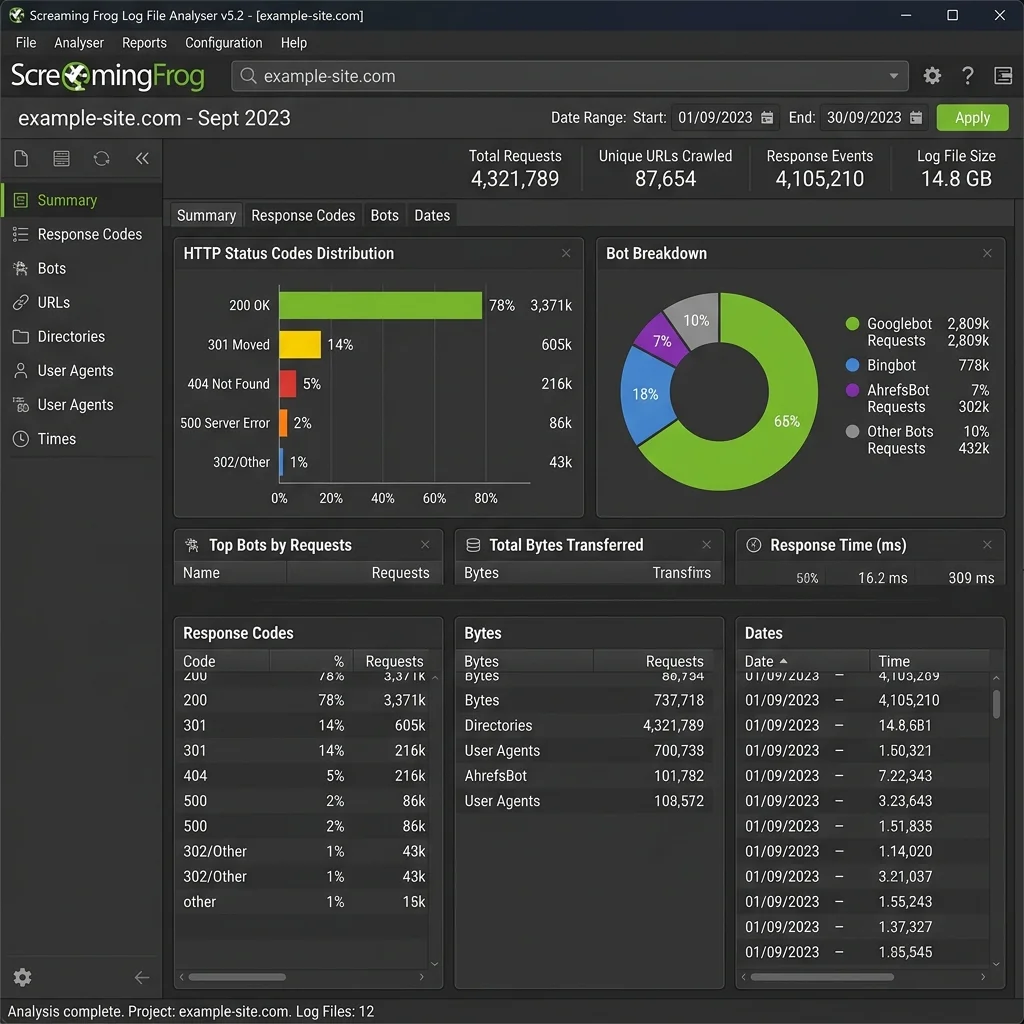
The Screaming Frog Log File Analyser is a desktop tool for processing log files:- Open the Log File Analyser and create a new project.
- Drag and drop your log files (supports
.log,.gz, and.zipformats). - The tool automatically categorizes requests by status code, directory, and user-agent.
- Export lists of broken links, redirect chains, or uncrawled pages to share with developers.
Log File Analysis With Python
For larger datasets, use Python and Pandas to analyze log files. Below is a script to parse Common Log Format entries, filter for Googlebot, and count status codes:## log_analyzer.py
import pandas as pd
import re
LOG_FILE = 'access.log'
## Regular expression to parse Common Log Format entry
LOG_PATTERN = re.compile(
r'(?P<ip>\S+)\s+\S+\s+\S+\s+\[(?P<time>[^\]]+)\]\s+"(?P<method>\S+)\s+(?P<path>\S+)\s+\S+"\s+(?P<status>\d+)\s+(?P<size>\S+)\s+"(?P<referrer>[^"]*)"\s+"(?P<user_agent>[^"]*)"'
)
def parse_line(line):
match = LOG_PATTERN.match(line)
if match:
return match.groupdict()
return None
def main():
parsed_lines = []
with open(LOG_FILE, 'r', encoding='utf-8') as f:
for line in f:
parsed = parse_line(line)
if parsed:
parsed_lines.append(parsed)
df = pd.DataFrame(parsed_lines)
if df.empty:
print("No log lines parsed. Check your log pattern.")
return
df['status'] = df['status'].astype(int)
# Filter for Googlebot visits
googlebot_df = df[df['user_agent'].str.contains('Googlebot', case=False, na=False)].copy()
print(f"Total Requests: {len(df)}")
print(f"Verified Googlebot Requests: {len(googlebot_df)}")
print("\nGooglebot Status Codes:")
status_counts = googlebot_df['status'].value_counts()
print(status_counts)
# Identify top 5 crawled paths
print("\nTop 5 Crawled Pages by Googlebot:")
print(googlebot_df['path'].value_counts().head(5))
# Find crawl waste (parameterized URLs)
waste_df = googlebot_df[googlebot_df['path'].str.contains(r'\?', regex=True)]
print(f"\nCrawl Waste (parameterized requests): {len(waste_df)} requests ({(len(waste_df)/len(googlebot_df)*100):.2f}%)")
if __name__ == '__main__':
main()Log File Analysis With BigQuery
For enterprise sites with millions of log rows, upload logs to Google BigQuery and query them using SQL:-- SQL Query to find Googlebot requests that resulted in 404 errors
SELECT
request_path,
COUNT(*) AS request_count,
ARRAY_AGG(DISTINCT client_ip LIMIT 3) AS sample_ips
FROM
`project_id.dataset_id.server_logs`
WHERE
LOWER(user_agent) LIKE '%googlebot%'
AND status_code = 404
GROUP BY
request_path
ORDER BY
request_count DESC
LIMIT 100;10. Enterprise Log Analysis Strategy
For large websites, managing raw logs can be challenging. An enterprise strategy involves:
- →Automated pipelines: Stream logs from servers (Nginx/IIS) or CDNs (Cloudflare Logpull) to a centralized storage bucket (e.g., AWS S3 or Google Cloud Storage).
- →Log management tools: Use platforms like Datadog, Splunk, or Elasticsearch (ELK Stack) to build real-time SEO dashboard monitors.
- →Regular audits: Conduct a comprehensive log audit quarterly to identify crawls shifts, sitemap changes, or server performance issues.
11. Common Mistakes
Avoid these common log analysis errors:
- →Relying solely on User-Agents: Malicious bots often spoof Googlebot user-agents. Always use reverse DNS lookup to verify crawl traffic.
- →Ignoring non-HTML assets: Googlebot crawls images, CSS, and JS files to render pages. Blocking these assets in
robots.txtcan prevent Google from indexing your content correctly. - →Analyzing short timeframes: Analyze at least 30 days of log data to account for weekly crawl fluctuations and identify long-term trends.
- →Failing to map logs to sitemaps: Always compare your logs with your active XML sitemaps to verify that your key pages are being crawled.
12. Core Web Vitals Implementation Checklist
- Export access: logs for a minimum 30-day period.
- Verify Googlebot: IPs using reverse DNS lookups.
- Group log: requests by file category (HTML, CSS, JS, Images).
- Identify URLs: returning 4xx and 5xx status codes.
- Locate redirect: chains and resolve loop paths.
- Identify parameterized: URLs that generate crawl waste.
- Match crawl: frequency against your internal page tree depth.
- Update internal: links pointing to redirected or broken pages.
- Configure
robots.txt: rules to block duplicate search filter patterns. - Fix soft: 404 errors by returning correct HTTP status codes.
- Submit updated: sitemaps containing only active, indexable URLs.
13. Common Core Web Vitals Mistakes
- →Failing to: set explicit dimensions (width/height) on images and ad containers, causing layout shifts.
- →Loading large: JavaScript bundles synchronously in the
<head>, delaying initial page rendering. - →Neglecting mobile-specific: performance, resulting in high LCP values on slower cellular networks.
- →Overlooking server: response times (TTFB) when debugging loading performance.
14. Official References
15. Conclusion
Successful execution of Log File Analysis for SEO: Find Crawl Waste, Redirect Loops, and Bot Dead Ends (2026) strategies is foundational to securing your digital marketing success in 2026. Without precise technical structure and expert-level implementation, it is impossible to protect domain authority, satisfy search bots, and understand customer paths.
Audit your setup regularly, focus on high-quality content that meets E-E-A-T expectations, and monitor performance indicators closely.
To deepen your technical expertise, read our guides on Technical SEO Checklist: Website Migration Guide (2026), and Google Search Console API Tutorial for SEO Reporting and Content Operations (2026).
Official References
- →Google Search Central: Google Common Crawlers
- →Google Search Central: Managing Crawl Budget for Large Sites
- →Google Search Central: Verifying Googlebot
- →Screaming Frog Log File Analyser Guide
- →Google Search Central - Technical SEO Documentation
- →Google Search Central - Crawl Budget Management
- →Google Search Central - Core Web Vitals Guide
Frequently Asked Questions
What is log file analysis in SEO?
Log file analysis is the process of examining raw web server access logs to understand how search engine crawlers (like Googlebot) interact with your website. It provides insights into crawl frequency, crawled URLs, status codes, and crawl budget distribution.
How do I verify a legitimate Googlebot visit in server logs?
Googlebot cannot be verified solely by its user-agent, as it can be easily spoofed. You must run a reverse DNS lookup on the client IP address to confirm it resolves to a google.com host, followed by a forward DNS lookup to verify the IP.
What is crawl waste?
Crawl waste occurs when search engine spiders spend their crawl budget index-scanning low-value or duplicate pages, such as paginated lists, user filter combinations, session IDs, and redirect chains, rather than crawling core revenue pages.

Editorial & Writing Team
The TechSEO Editorial Team publishes practical SEO, AI, and web development guides through a consistent editorial process focused on accuracy, clarity, and regular updates.
Subscribe to TechSEO Insights
Get the latest guides on technical SEO, Core Web Vitals, and content marketing delivered straight to your inbox.
Privacy Note: By subscribing, you agree to receive our newsletter (Lawful Basis: Consent). We retain your email address until you choose to unsubscribe. For more details, view our Privacy Policy.