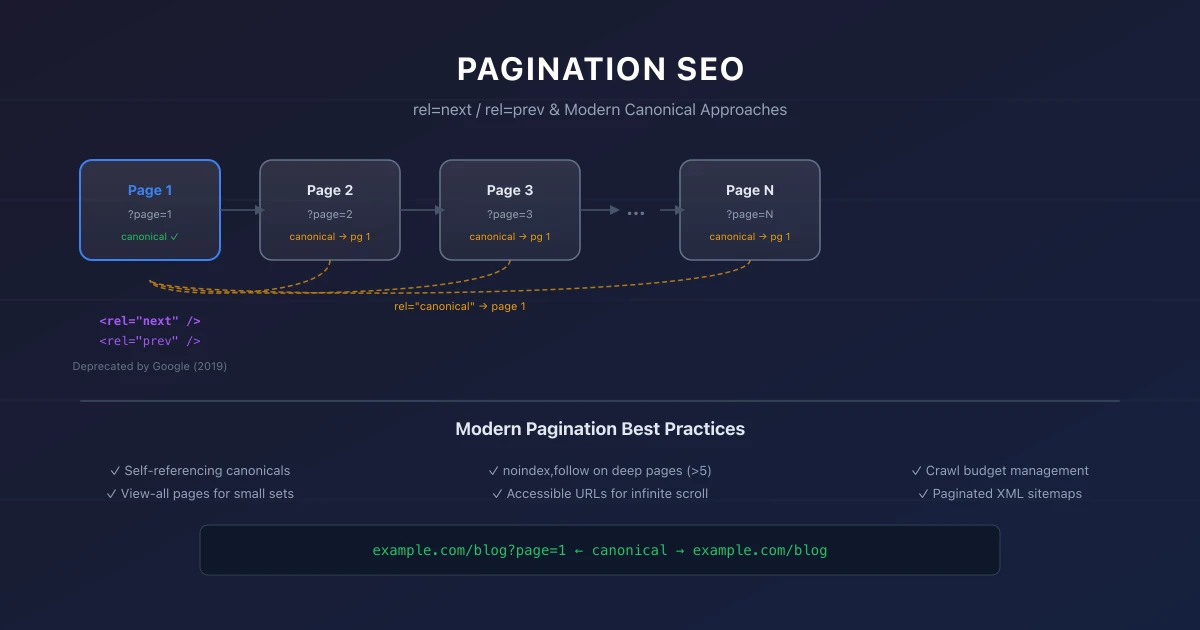
Pagination SEO: rel=next, rel=prev, and Modern Approaches
Navigate the complexities of pagination SEO, from deprecated rel=next/prev tags to modern strategies for infinite scroll and load-more patterns.
Key Takeaways
- Google deprecated rel=next and rel=prev in 2019, but they may still provide guidance
- Canonical URLs are now the primary tool for pagination handling
- View-all pages consolidate paginated content onto a single URL
- Infinite scroll requires careful implementation to maintain indexability
- Load-more buttons need accessible URLs that search engines can crawl
Pagination presents one of the most persistent challenges in SEO. When content spans multiple pages, search engines must understand how those pages relate to each other and which version to show in search results.
The landscape of pagination SEO has shifted. Google deprecated support for rel=next and rel=prev in 2019, yet many sites still use these tags. Modern approaches focus on canonical URLs, view-all pages, and JavaScript-based patterns. Understanding each approach helps you choose the right strategy for your site.
1. The Rise and Fall of rel=next and rel=prev
Google introduced rel=next and rel=prev in 2011 to help search engines understand paginated content. The tags told Google that pages 1, 2, 3, and so on were part of a series and should be treated as a single sequence.
In 2019, Google announced that rel=next and rel=prev no longer affect search results. Google stated it had gotten better at understanding pagination patterns without these tags, making them unnecessary.
Despite this announcement, many SEOs continue using rel=next and rel=prev. The tags do not harm SEO and may still provide guidance to Bing and other search engines. However, Google no longer uses them as a ranking signal.
2. Google's Current Pagination Guidance
Google now recommends using canonical URLs as the primary mechanism for pagination handling. The approach depends on your content type and site structure.
For article lists and category pages, point all paginated pages to the first page using a canonical tag. This tells Google that page 1 is the canonical version of the series.
For ecommerce category pages, point each paginated page to itself using a self-referencing canonical. Google will then select the most relevant page to show in search results based on user intent.
3. View All Pages
A view-all page displays all paginated content on a single page. This approach eliminates pagination entirely but works only for sites with limited content per section.
View-all pages help search engines discover all content from a single URL. They consolidate link equity and simplify the indexation process. However, view-all pages can be slow to load if they contain too much content.
If your category or tag page lists 50 items across 5 pages, a view-all page with all 50 items works well. If your page spans 500 items across 50 pages, a view-all page would be impractically large.
4. SEO-Friendly Pagination Patterns
Self-Referencing Canonicals
Use self-referencing canonicals on each paginated page. This approach tells Google that page 2 of your category is a distinct page that may rank for different queries than page 1.Add a noindex, follow meta tag to paginated pages deeper than page 5. This allows link equity to flow from deep paginated pages while preventing thin content from appearing in search results.
First Page Canonical
Use rel=canonical pointing to page 1 on all paginated pages. This approach consolidates link equity onto the first page and signals that paginated content is part of a series.This approach works well for article archives and blog category pages where the first page contains the most relevant content.
View All with Canonical
Create a view-all page and set it as the canonical URL for all paginated pages. This approach consolidates all link equity and content signals onto a single URL.5. Load More Buttons
Load-more buttons present unique SEO challenges. The content loaded by the button may not be visible to search engines unless implemented correctly.
To make load-more buttons SEO-friendly, ensure that:
- →Clicking the button triggers a URL change or adds URL parameters
- →Each page of content has a unique URL that can be accessed directly
- →Internal links point to both the initial and subsequent pages
- →The initial page contains all important content
6. Infinite Scroll
Infinite scroll automatically loads new content as the user scrolls down the page. This pattern is popular for user experience but difficult for SEO.
Implement infinite scroll with a progressive enhancement approach:
- →Serve a traditional paginated version of content to search engines
- →Use JavaScript to enhance the experience for users with JavaScript enabled
- →Ensure each page of content has a unique URL
- →Use the History API to update URLs as users scroll
7. Canonical URLs for Pagination
Canonical URLs are the most important pagination signal. Choose your canonical strategy based on your goals:
If you want all paginated pages to be indexable, use self-referencing canonicals. If you want to consolidate signals onto the first page, use a first-page canonical. If you have a view-all page, point all paginated pages to the view-all URL.
For canonical URL best practices, see our canonical URL guide.
For a broader technical SEO perspective, see our technical SEO audit checklist.
8. Technical Implementation Steps
- Analyze Current State: Review Google Search Console crawling stats.
- Identify Errors: Filter by 4xx/5xx status codes.
- Map Redirects: Draft 301 redirects maps for any moved URLs.
- Verify Implementation: Run Lighthouse CI/Screaming Frog audit.
- Monitor GSC: Verify Google has updated the index successfully.
9. Common Mistakes
- →Blocking JavaScript & CSS in robots.txt: Googlebot needs to render layout styles to calculate Core Web Vitals like CLS and LCP accurately.
- →Not Preloading Critical Hero Images: Forgetting to preload the LCP image delays rendering, resulting in a poor Lighthouse speed score.
- →Ignoring Client-Side Render Latency: Relying entirely on client-side JS executing without an HTML backup blocks indexation on other search engines like Bing.
10. Core Web Vitals Implementation Checklist
- Check Canonical Mapping: Ensure paginated pages use self-referential canonical tags.
- Audit Internal Links: Verify pagination links are standard HTML anchor tags.
- Optimize Crawl Depth: Implement "Load More" or pagination numbers to reach deep pages.
- Monitor Indexation status: Check GSC to see if paginated pages are crawled correctly.
11. Common Core Web Vitals Mistakes
- →Failing to: set explicit dimensions (width/height) on images and ad containers, causing layout shifts.
- →Loading large: JavaScript bundles synchronously in the
<head>, delaying initial page rendering. - →Neglecting mobile-specific: performance, resulting in high LCP values on slower cellular networks.
- →Overlooking server: response times (TTFB) when debugging loading performance.
12. Official References
13. Conclusion
Successful execution of Pagination SEO: rel=next, rel=prev, and Modern Approaches strategies is foundational to securing your digital marketing success in 2026. Without precise technical structure and expert-level implementation, it is impossible to protect domain authority, satisfy search bots, and understand customer paths.
Audit your setup regularly, focus on high-quality content that meets E-E-A-T expectations, and monitor performance indicators closely.
To deepen your technical expertise, read our guides on Google AI Overviews and AI Mode SEO: A Practical Visibility Framework (2026), Core Web Vitals Debugging Playbook: Diagnose and Fix LCP, INP, and CLS Issues, and Internal Linking Strategy for SEO: A Complete Framework.
Official References
Frequently Asked Questions
Should I still use rel=next and rel=prev?
Google no longer uses these tags, but they do not harm SEO. Bing still supports them. Using them is optional.
Do paginated pages compete with each other in search results?
Yes, if they have similar content. Use canonical URLs to signal which page should rank.
Should I noindex paginated pages?
Consider noindexing paginated pages deeper than page 5 to prevent thin content from appearing in search results. Use noindex, follow to allow link equity to pass.
How does infinite scroll affect crawl budget?
Infinite scroll can waste crawl budget if search engines cannot find all your content. Ensure traditional pagination exists alongside infinite scroll for search engine crawlers.
What is the best pagination approach for ecommerce?
Use self-referencing canonicals on each paginated page. This allows different product pages to rank for different queries while maintaining a clear structure.

Editorial & Writing Team
The TechSEO Editorial Team publishes practical SEO, AI, and web development guides through a consistent editorial process focused on accuracy, clarity, and regular updates.
Subscribe to TechSEO Insights
Get the latest guides on technical SEO, Core Web Vitals, and content marketing delivered straight to your inbox.
Privacy Note: By subscribing, you agree to receive our newsletter (Lawful Basis: Consent). We retain your email address until you choose to unsubscribe. For more details, view our Privacy Policy.