Site Architecture for SEO: Building a Search-Friendly Structure
Design a site architecture that maximizes crawl efficiency, distributes link equity, and helps users and search engines find your most important content.
Key Takeaways
- Flat architecture helps search engines reach deep content in fewer clicks
- Silo structure groups related content to build topical authority
- URL structure should reflect content hierarchy
- Breadcrumbs improve navigation and create internal links
- The 3-click rule is a guideline, not a ranking factor
- Regular architecture audits prevent crawl waste and orphan pages
Site architecture is the structural foundation of your SEO strategy. How you organize pages, connect them through internal links, and structure your URL hierarchy determines how much of your site gets crawled, how link equity flows, and which pages rank.
A well-designed site architecture benefits both users and search engines. Users find what they need quickly. Search engines crawl efficiently and understand content relationships. The result is better rankings across your entire site.
1. Flat vs Deep Architecture
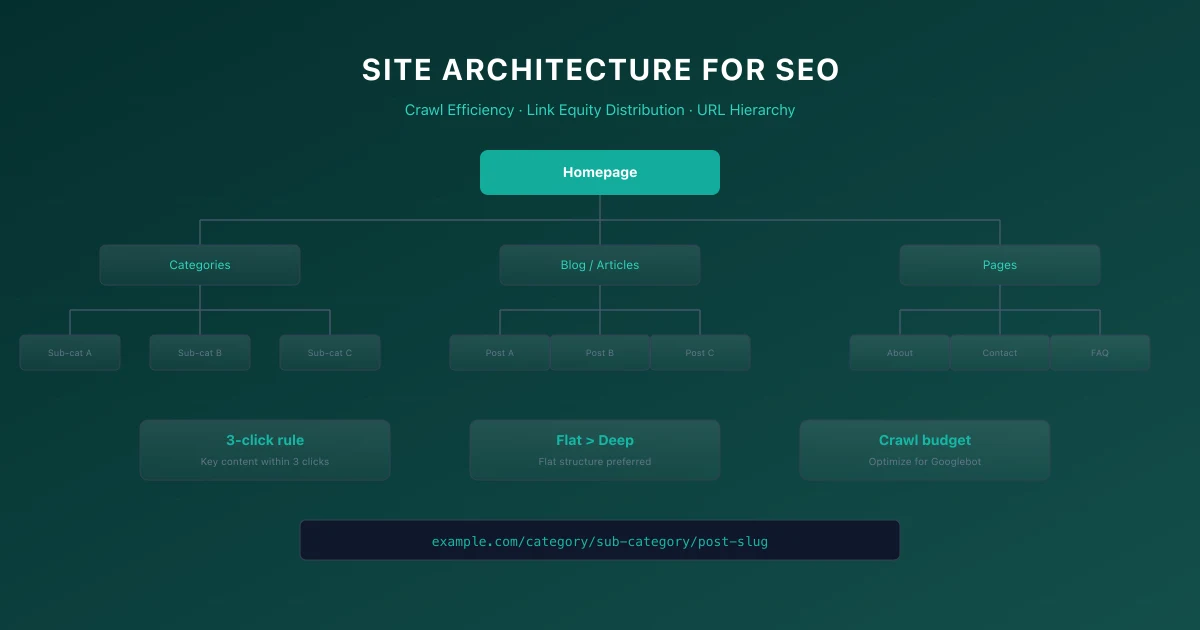
Site architecture exists on a spectrum from flat to deep. Flat architecture means most pages are reachable within a few clicks from the homepage. Deep architecture requires many clicks to reach some pages.
Flat architecture is generally better for SEO. Pages only a few clicks from the homepage receive more link equity and get crawled more frequently. A flat structure with three to four levels works well for most sites.
Deep architecture buries important content. Pages five or more clicks from the homepage may never get crawled or indexed. If Googlebot runs out of crawl budget before reaching those pages, they will not appear in search results.
2. Silo Structure
A silo structure groups related content into thematic sections. Each silo covers a broad topic, with subtopics organized hierarchically within the silo. This structure helps search engines understand content relationships and builds topical authority.
To implement silos, organize your site by topic rather than content type. Instead of mixing all blog posts, products, and guides together, group them by subject area. Each silo should have a pillar page that provides a comprehensive overview of the topic.
Internal links should stay within the same silo whenever possible. Link from pillar pages to subtopic pages and back. Cross-linking between silos is fine but should be less frequent than links within a silo.
3. URL Structure Best Practices
Your URL structure should mirror your site architecture. Clean, logical URLs help search engines understand page relationships and give users confidence before they click.
Use these URL structure guidelines:
- →Keep URLs short and descriptive
- →Use hyphens to separate words
- →Place important keywords near the beginning
- →Reflect content hierarchy in the path
- →Avoid unnecessary parameters and subdirectories
4. Navigation Best Practices
Navigation is the primary way both users and search engines discover your content. A well-designed navigation system makes your site architecture visible and accessible.
Primary navigation should include links to your most important pages. Limit main navigation to five to seven items. Too many choices overwhelm users and dilute link equity.
Secondary navigation like sidebar menus, footer links, and related content sections provide additional pathways through your content. Use them strategically to connect related pages.
For large sites with hundreds of pages, consider mega menus, faceted navigation, or dynamically generated related content sections. These approaches surface deep content without cluttering the main navigation.
5. Breadcrumbs
Breadcrumbs serve two purposes. They help users understand where they are in your site structure, and they create internal links that reinforce your architecture for search engines.
Implement breadcrumbs on every page except the homepage. Use the BreadcrumbList structured data to enable rich results in search.
Breadcrumbs should follow this pattern: Home > Category > Subcategory > Page. Each breadcrumb link should point to a real page.
6. Internal Linking for Architecture
Your internal linking strategy is the engine that drives your site architecture. Every internal link passes link equity and signals content relationships to search engines.
Strategic internal linking follows these principles:
- →Link from high-authority pages to pages that need ranking help
- →Use descriptive anchor text that includes target keywords
- →Link from pillar pages to cluster content and back
- →Avoid excessive links on a single page
- →Ensure every page has at least one internal link from another page on your site
7. The 3-Click Rule Myth
The 3-click rule states that every page should be reachable within three clicks from the homepage. This is a user experience guideline, not a Google ranking factor.
Google does not have a click-depth penalty. However, pages that require many clicks to reach often receive less link equity and may get crawled less frequently. The real issue is not clicks but the link equity required to reach deep pages.
Focus on ensuring important pages get enough internal links, rather than obsessing over an arbitrary click count.
8. Conducting a Site Architecture Audit
Audit your site architecture annually or after major site changes. Use crawling tools to map your site structure and identify issues.
Check for these problems:
- →Orphan pages with no internal links
- →Pages requiring more than five clicks from the homepage
- →Navigation that does not reflect content priorities
- →URL structures that do not match page hierarchy
- →Missing breadcrumbs on important pages
For performance considerations, see our Core Web Vitals guide.
9. Technical Implementation Steps
- Analyze Current State: Review Google Search Console crawling stats.
- Identify Errors: Filter by 4xx/5xx status codes.
- Map Redirects: Draft 301 redirects maps for any moved URLs.
- Verify Implementation: Run Lighthouse CI/Screaming Frog audit.
- Monitor GSC: Verify Google has updated the index successfully.
10. Common Mistakes
- →Blocking JavaScript & CSS in robots.txt: Googlebot needs to render layout styles to calculate Core Web Vitals like CLS and LCP accurately.
- →Not Preloading Critical Hero Images: Forgetting to preload the LCP image delays rendering, resulting in a poor Lighthouse speed score.
- →Ignoring Client-Side Render Latency: Relying entirely on client-side JS executing without an HTML backup blocks indexation on other search engines like Bing.
11. Core Web Vitals Implementation Checklist
- Establish Flat Structure: Keep important pages within three clicks from the home page.
- Implement Breadcrumbs: Enable structured breadcrumbs with matching schema markup.
- Audit Internal Link Flows: Focus link equity on highest-value landing pages.
- Clean Up Orphan Pages: Connect isolated pages back to the main category hubs.
12. Common Core Web Vitals Mistakes
- →Failing to: set explicit dimensions (width/height) on images and ad containers, causing layout shifts.
- →Loading large: JavaScript bundles synchronously in the
<head>, delaying initial page rendering. - →Neglecting mobile-specific: performance, resulting in high LCP values on slower cellular networks.
- →Overlooking server: response times (TTFB) when debugging loading performance.
13. Official References
14. Conclusion
Successful execution of Site Architecture for SEO: Building a Search-Friendly Structure strategies is foundational to securing your digital marketing success in 2026. Without precise technical structure and expert-level implementation, it is impossible to protect domain authority, satisfy search bots, and understand customer paths.
Audit your setup regularly, focus on high-quality content that meets E-E-A-T expectations, and monitor performance indicators closely.
To deepen your technical expertise, read our guides on Google AI Overviews and AI Mode SEO: A Practical Visibility Framework (2026), and Core Web Vitals Debugging Playbook: Diagnose and Fix LCP, INP, and CLS Issues.
Official References
Frequently Asked Questions
Does site architecture directly impact rankings?
Site architecture impacts crawl efficiency, link equity distribution, and content discoverability. These factors indirectly affect rankings.
How many levels deep should my site be?
Three to four levels from the homepage works for most sites. Important content should be within two to three clicks.
Should I use subdomains or subdirectories for different content sections?
Use subdirectories. They consolidate domain authority under a single domain and are simpler to manage.
What is the best way to structure a large ecommerce site?
Use category > subcategory > product with breadcrumbs, faceted navigation with proper canonical URLs, and a robust internal linking strategy between related products.
Do breadcrumbs help with SEO?
Yes. Breadcrumbs create internal links, help search engines understand site structure, and enable rich results when marked up with structured data.

Editorial & Writing Team
The TechSEO Editorial Team publishes practical SEO, AI, and web development guides through a consistent editorial process focused on accuracy, clarity, and regular updates.
Subscribe to TechSEO Insights
Get the latest guides on technical SEO, Core Web Vitals, and content marketing delivered straight to your inbox.
Privacy Note: By subscribing, you agree to receive our newsletter (Lawful Basis: Consent). We retain your email address until you choose to unsubscribe. For more details, view our Privacy Policy.